Run every major conference as a repeatable organizational capability
Planned annually. Coordinated before. Commanded on-site. Closed-loop after. Archived forever.
Plenum upgrades your biggest conferences from «rebuilt from scratch every time» into a plannable, repeatable, and accountable operating system.
work report not finalized · 3 guests unconfirmed…
Conferences don't lack experience.
They lack a way to keep it.
Every annual summit, the organizing team redoes the same work: rebuild the spreadsheet, recreate the chat groups, resend the “final” deck. When the meeting ends, the experience evaporates.
- The annual plan lives in spreadsheets — nobody knows which version is current
- Dozens of chat groups to coordinate, materials chased by hand
- “final_v2_REAL-final.docx” flying back and forth
- Game day runs on walkie-talkies and personal memory
- Decisions get buried in the minutes, never revisited
- Years of materials asleep in shared drives and laptops
- The whole year on one map, conflicts flagged automatically
- One click turns a template into a full preparation project
- Versioned materials, with deadlines chased automatically
- A live command console for check-in, agenda, and scoring
- Decisions assigned to owners, closed-loop into the next meeting
- Editions, results, and awards auto-archived — askable by AI anytime
A major conference is not a square on the calendar
It's a campaign that runs for weeks, sometimes months. Plenum covers the full cycle — from annual planning to retrospective evolution.
Annual Planning
The whole year on one map; time, leader, and resource conflicts auto-detected
Preparation
Templates generate the task tree — workgroups, owners, and milestones in place
On-site Execution
The command console runs check-in, seating, agenda, scoring, and incidents live
Decision Tracking
AI extracts decisions — owners, due-date alerts, escalation when overdue
Asset Archiving
Materials, speeches, minutes, footage — and results and awards — auto-filed
Retrospective
AI writes the retro report; lessons flow back into the template
Space, time, and handovers. In one view.
Rehearse each phase of the conference, inspect a session’s readiness, and trace a person or piece of equipment through the day. See what is ready, what needs a handover, and where assignments collide.
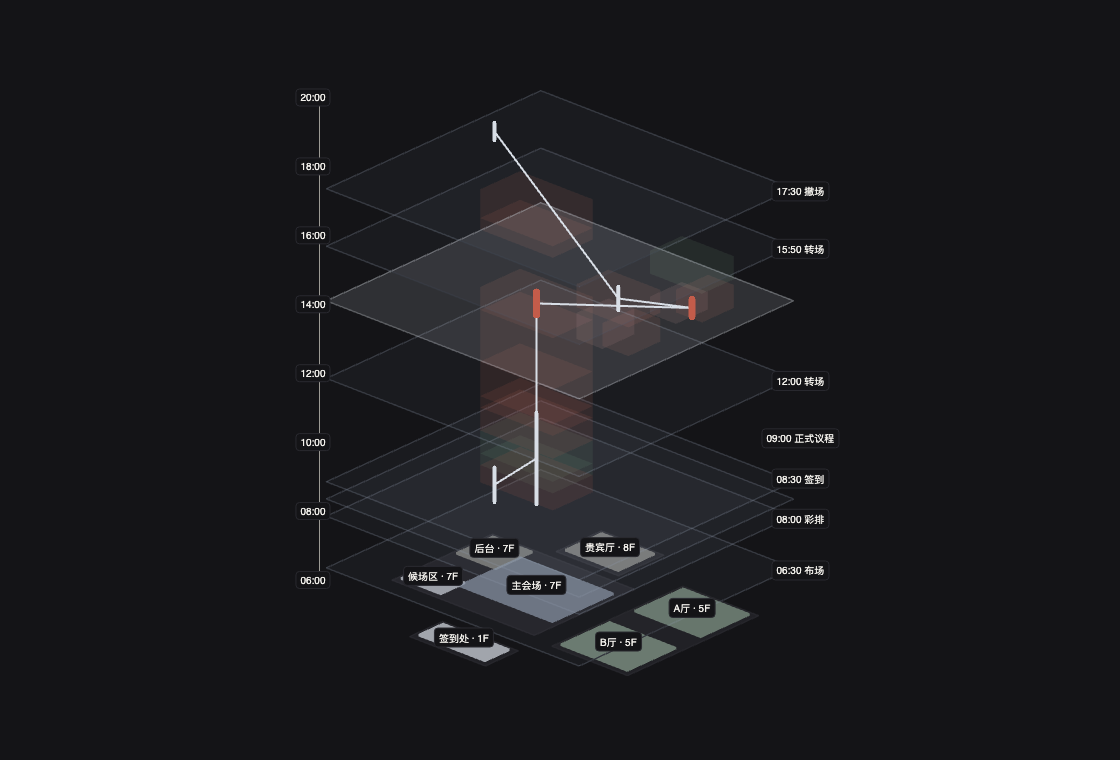
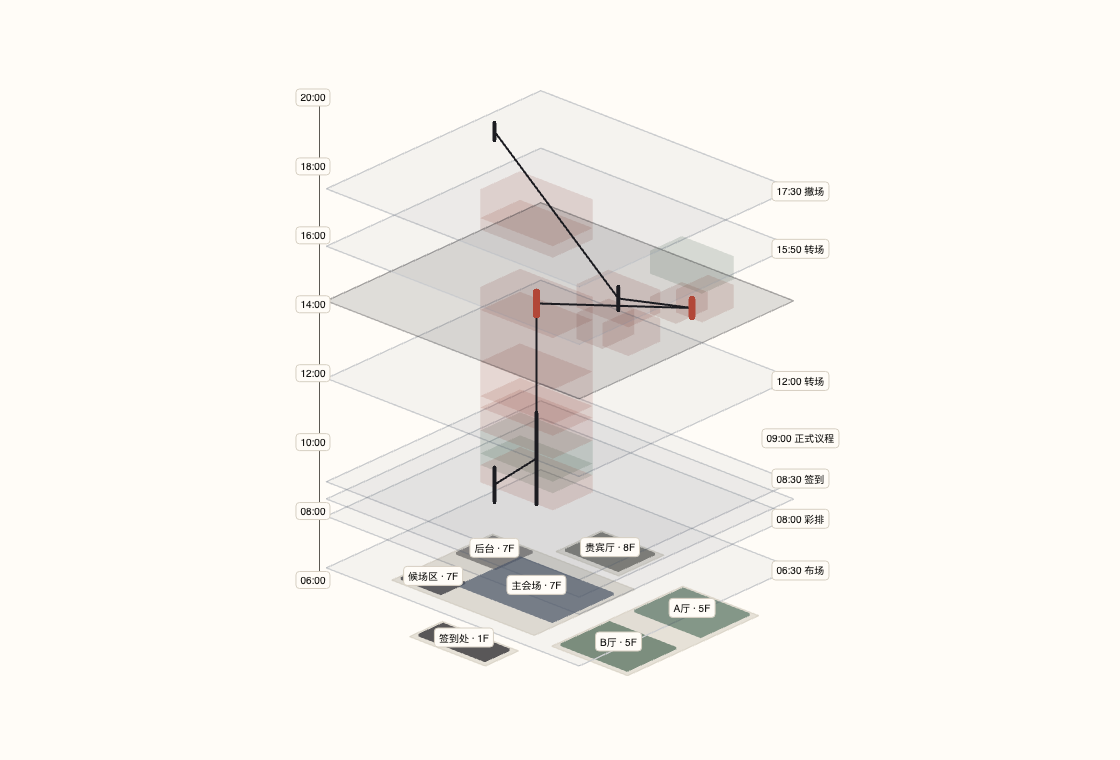
Double booking · Clicker #2 · Main hall / Hall A · 14:00–14:10
- 01
Rehearse the day in space and time
Stack setup, rehearsal, check-in, sessions, transitions, and teardown above the venue spaces. Scrub time, isolate a phase, and switch between top, side, and isometric views.
SetupRehearsalCheck-inSessionsTransitionTeardown - 02
Inspect six execution dependencies
Check guest arrival, slides, video testing, interpretation, MC script, and the next guest’s staging. Arrival and material status stay linked; mark on-site checks ready with one click.
- 03
Trace resources. Spot conflicts.
Follow a staff member, speaker, or clicker across rooms. Overlapping assignments turn red. Select an exception to locate the affected work and coordinate the next handover.
One platform for the entire conference
From the plan made in January, to every minute on game day, to where every decision ends up. When needed, the same conference can also run pitches and judging.
Every conference of the year, on one map
Compile the annual conference plan once a year. Recurring meetings roll over automatically; ad-hoc meetings spin up fast. Time conflicts, leader conflicts, and venue conflicts surface at planning stage — not on game day.
- Year, month, timeline, and list views
- Triple conflict detection: time, leaders, resources
- Recurring meetings roll into next year's plan in one click
Pick a template, generate the whole project
Every meeting type has a standard template: default runway, workgroups, task tree, milestones, and material checklist. Tasks are assigned and chased automatically; overdue items escalate into risks.
- Tasks organized by workgroup — not a flat to-do list
- Milestones from T-30 to T+3, tracked automatically
- Each edition's lessons write back into the template
On game day, see only what matters most
Live mode puts the countdown, check-in, VIP arrivals, current agenda item, and incidents on one screen. Every staff member sees only their own tasks; agenda changes recalculate timings and notify the right people.
- QR and VIP fast check-in, with a live absentee list
- Drag the agenda — timings recalculate automatically
- Staff tasks to the minute; with contest on, the current pitch is the score desk
The meeting ends. The work begins.
AI extracts decision items from recordings, minutes, and leadership speeches in real time; one click confirms them into tracking — owner department, owner, deadline, acceptance criteria. The next meeting auto-generates a “status of last quarter's decisions” agenda item.
- One sentence from the leader becomes a proposed decision, live
- Tracking cockpit: department ranking and overdue analysis
- Outcomes roll automatically into the next meeting
Every edition becomes long-term memory
Twelve asset types auto-archive when the meeting ends: plan, notice, attendee list, agenda, materials, speeches, photos, footage, minutes, decisions, and execution status. With contest on, the roster, submissions, scores, and awards join the file. Editions compare year over year; AI answers anything from the full history.
- A digital archive forms with zero manual filing
- Compare agendas, speeches, decisions, and awards across editions
- Search all conference knowledge in natural language
The same conference can also run a contest
Innovation summits, pitch days, hackathons, and awards galas keep judging inside the meeting — not in a second app. Turn on the contest facet in settings: people become contestants and judges, materials become submissions, agenda slots become pitches and the ceremony, the live console becomes the score desk. Strategy offsites and customer summits stay untouched — no contest nav.
- Tracks, registration review, roster and captain — same people list
- Judge recusal, weighted sheets, prelims into finals; live scoring, publishable results
- Awards galas import last edition's published prizes into the archive and ceremony
AI is not a chat box.
It's an assistant throughout the conference.
It plans before, records during, and follows through after.
Preparation turns from experience into algorithm
- One sentence generates the full plan: workgroups, tasks, milestones, risk list
- Clone last year's edition — AI analyzes delays and gaps, suggests new tasks
- Ask “what's still missing” anytime, get an instant risk list
A: 6 workgroups, 47 tasks, and 11 milestones generated.
Every sentence is understood
- Live transcription with speaker identification, attributed automatically
- Decisions, directives, to-dos, risks, and key data extracted in real time
- A request from the floor becomes a proposed decision — confirm in one click
→ Proposed decision: IT · due Dec 31
Adjournment is not the finish line
- Draft minutes generated automatically, every paragraph traceable to its source
- Decisions decomposed into tracked items, with reminders and escalation
- Retrospective report generated, with suggested template updates
A: 4 requirements across 3 departments — 3 completed.
Everyone in the conference gets their own view
Fine-grained permissions: everyone sees exactly what they should — and gets reminded only of what they own.
Executives
A leadership portal: the year's conferences, material readiness, and decision progress at a glance.
Host Dept Owner
Initiates the meeting, sets the plan, reviews materials, coordinates departments, supervises progress.
Chief Coordinator
The command console: plans, task assignment, progress tracking, and game-day control.
Workgroup Leads
Logistics, materials, reception, publicity, contest ops — every group's tasks clear to the person.
Material Owners
Reports, speeches, decks, handbooks — submission, versioning, and review fully transparent.
Attendees
Notice, schedule, seat, materials, check-in, and post-event files — all in one place.
Decision Owners
Action items, deadlines, feedback, and acceptance — gently but firmly reminded.
Admins
Templates, permissions, org structure, tags, AI capabilities, and integrations in one console.
Team Captains
Confirm the roster and submit work versions. The portal shows their team and published results — never other teams' raw scores.
Judges
Score live by track and round. Recused orgs are excluded; unpublished scores never appear in the UI.
Let the next conference start
from the last one's lessons
Enter Plenum to connect preparation, handovers, and execution—from the conference plan to Panorama View.